A simpler When2meet alternative: pick a day, not a time grid
When2meet is a well-known way to find a slot for a group. If what you actually need is a date rather than an hour, it asks for more setup than the job requires. 2meet takes the other approach: open a month calendar, tap the days that work, done. Free, no account.
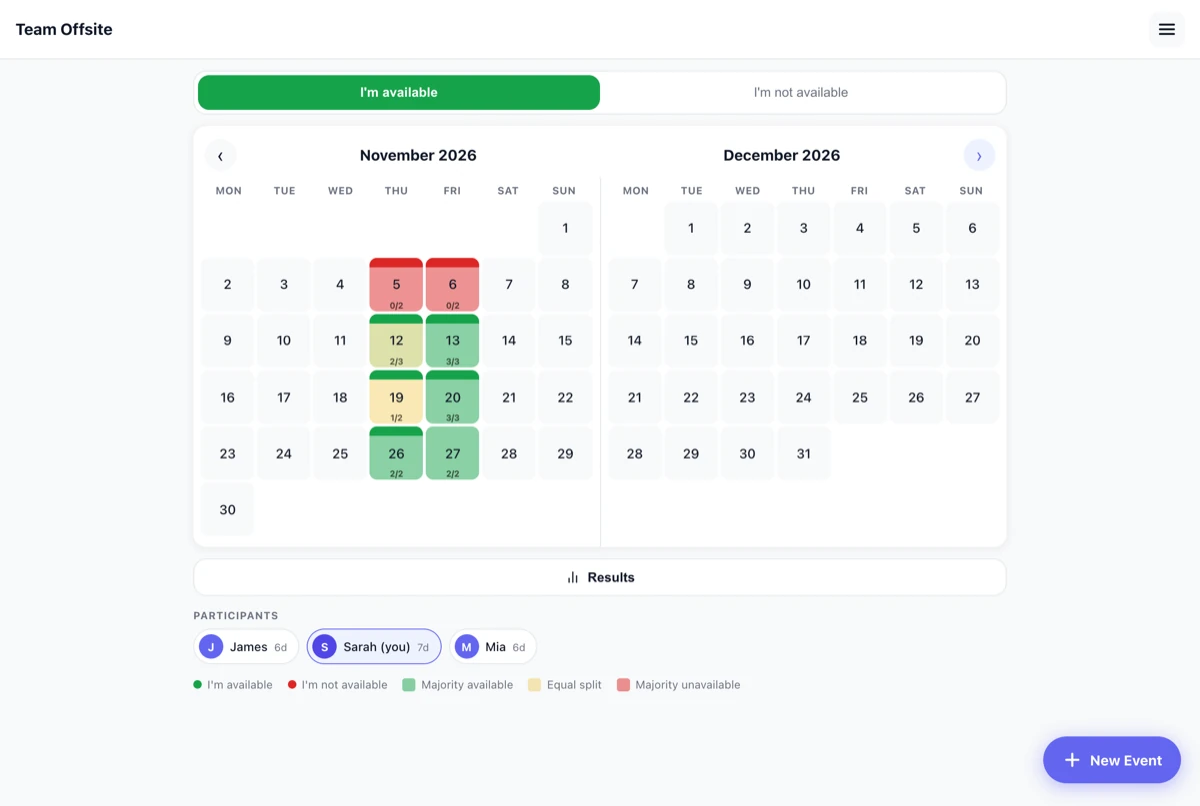
The main difference
With When2meet, the person creating the event first drags across a calendar to pick which dates are candidates, then chooses a range of hours and a time zone. Participants then fill in a grid of time slots inside that window. That is exactly right when you are placing a two-hour meeting.
2meet skips all of it. There is no date range to define up front and no time-of-day grid: the calendar is simply there, and everyone taps whole days. For a barbecue, a weekend trip, a club night or a family visit, the day is the decision – the hour gets sorted out later in the chat anyway.
| 2meet | When2meet | |
|---|---|---|
| Granularity | Whole days | Time slots within a chosen window |
| Setup by the organiser | Event name only | Candidate dates, hour range, time zone |
| Saying "I can't" | Explicit – red marks a definite no | Availability only |
| Interface languages | English and German | English |
| Price | Free, no ads | Free |
When When2meet is the better choice
If your group spans several time zones, or you need to land on a specific hour rather than a day – a recurring standup, a call with people in three countries, a two-hour slot in a busy week – then a time-slot grid is the right tool and 2meet will not help you. 2meet has no time-of-day layer at all. That is a deliberate limitation, not something on a roadmap.
What 2meet adds
- A real "no". Tapping a day a second time marks it red. The difference between "hasn't answered yet" and "definitely cannot" is visible, which is usually what stalls a group chat.
- A heatmap instead of counting. Days shade from red through yellow to green depending on how the group voted, with a count underneath.
- A ranked result. One tap sorts every date by yes votes and shows by name who can and cannot make it.
- Nothing to set up. No account, no password, no time zone, no date range. Share a link and people are in.
- Real-time updates. Votes appear for everyone without a reload.
How it works
- Create an event and give it a name.
- Share the link via WhatsApp, iMessage, email or QR code.
- Everyone taps the days they are free. The best date surfaces on its own.
See the full step-by-step guide with screenshots →
Questions people ask
Is 2meet really free?
Yes. No ads, no premium tier, no hidden costs.
Do participants need an account?
No. They open the link, type a first name, and start tapping. A nickname works.
Can I schedule a specific time of day?
No. 2meet works at the level of whole days. If you need hours, use a time-slot tool instead.
Where is the data stored?
On Google Cloud servers in Frankfurt, Germany. Nothing is tracked and no advertising is shown. See the privacy policy.